Pilots
Each staff member’s RePL must be recorded here. A release cannot be submitted by a pilot who is not in the register (§1.1.1, §1.1.3).
Licence register
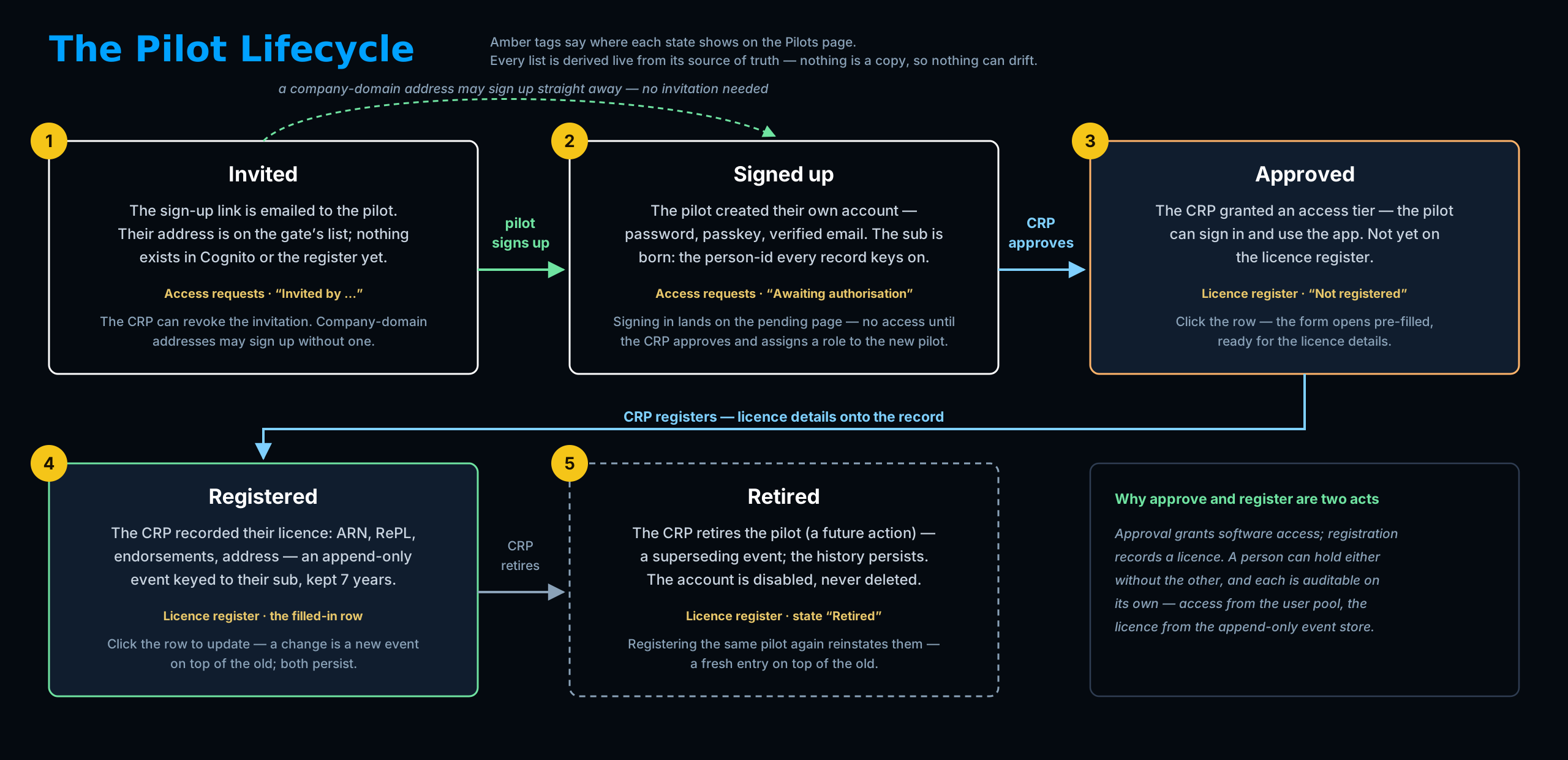
—Incomplete — the account is approved and can use the app, but holds no licence record yet. Click the row: the Register pilot form opens pre-filled — add the ARN, RePL details and address, and submitting registers them.
Registered — on the licence register with their ARN and endorsements recorded. Currency tracking is not live yet, so every registered pilot rests here until flight records start feeding the 90-day count.
Current / Lapsed — the §1.1.12 launch-and-recovery check: three in the previous 90 days, or the pilot is lapsed and cannot submit a release until remediation is shown to the CRP.
Retired — no longer operating; the entry and its history stay on the register for the retention period. Registering the same person again reinstates them with a fresh entry on top of the old.
| Pilot | ARN | RePL | Endorsements | Role | State |
|---|---|---|---|---|---|
| Loading… | |||||
Blocked at submission
—The §1.1.12 recency rule: a pilot needs three launches and recoveries in the previous 90 days to submit an operational release. Anyone short of that appears here, with their gap stated — and the system refuses their release submissions until remediation is demonstrated to the Chief Remote Pilot.
Blocked means blocked from submitting releases only — they can still sign in and view. Currency tracking is not live yet, so today no one carries currency data and this panel stays empty; it fills when flight records start feeding the 90-day count.
Access requests
—Invited — the sign-up link has been emailed. The next move is the pilot's: they follow the link, create their account and verify their email. Nothing appears in Cognito until they do. Revoke withdraws the invitation; the gate refuses the address from the next attempt.
Email not yet verified — they signed up but haven’t entered the emailed code. Still their move.
Awaiting authorisation — the account exists and the move is yours: confirm the person holds a RePL, pick an access level and approve. It takes effect on their next sign-in or token refresh.
| Pilot | Stage | Action |
|---|