Operations / New operation
UTC--:--:--
Sydney--:--:--

New operation

DraftNot yet submitted
Draft
Sections
✕2 ✓4 ?6
  1. 1. Plan3/7
  2. 2. Compliance1/4
  3. 3. Confirm0/1
01

Site & schedule

When and where — everything that decides whether the operation is possible.

Earth2 Recon's service lines. The choice drives the default risk rows and the JSA items that are pre-assessed.
Only for multi-day operations
Entered in Sydney local time, stored as UTC with offset. The date and time are taken first so the airspace and weather checks can run against them the moment a site is picked.
ICAO DAH format, from the selected place. Type over it in DAH or as a decimal pair.
Filled from Google Elevation once a coordinate is set — confirm it, or type over it
Three words, dots between. On the day: the app at the launch point. Planning: open what3words, search the address, drop the pin where you will stand, copy the words.
Written from the coordinate, the radius and the maximum altitude. Carried to the JSA, the briefing and the release.
Where the aircraft goes if the launch point is lost. Also named on the briefing.
Within the 120 m limit
Checked against the standard operating condition and the aircraft's own limit
By day
Waiting for a date, times and a coordinate
Weather for the window
Waiting for a date, times and a coordinate
Air quality and pollen
Waiting for a date and a coordinate
NOTAMs
Not yet briefed
Filled in from the address and the type of work. Type over it and it stays as you wrote it.
02

Client & Job

Who the work is for, and what is fitted to the aircraft.

Carried onto the operational release as the task description.
Tethered operation
The RPA is physically tethered for this job.
One item per line. Carried into the release and the flight log.
03

Aircraft & Pilot

Chosen from the registers, so the logs fill themselves.

Aircraft
Quarantined RPA cannot be selected.
From the RPA register
From the RPA register — the experience gates count hours on this type
RPA serviceable *
The remote pilot declares the aircraft serviceable for this operation — pre-flight checks done, no open defects. The authorisation gate reads this declaration together with the register's airworthiness answer below.
Pilot
From the licence register
The organisation, not the pilot.
Serviceability and currency
Checked once an aircraft is selected — register entry, quarantine, open defects, and the pilot's 90-day recency
04

Airspace & site check

Eight checks the remote pilot performs against an approved source and attests. Every row records what was read, where, and when; a Block or an empty row stops authorisation.

Official charts for this site
Pick the site in step 01 first
The approved source the pilot read. OzRunways shows its database date under Settings.
Stamped on every row below.
Aerodromes & helicopter landing sites
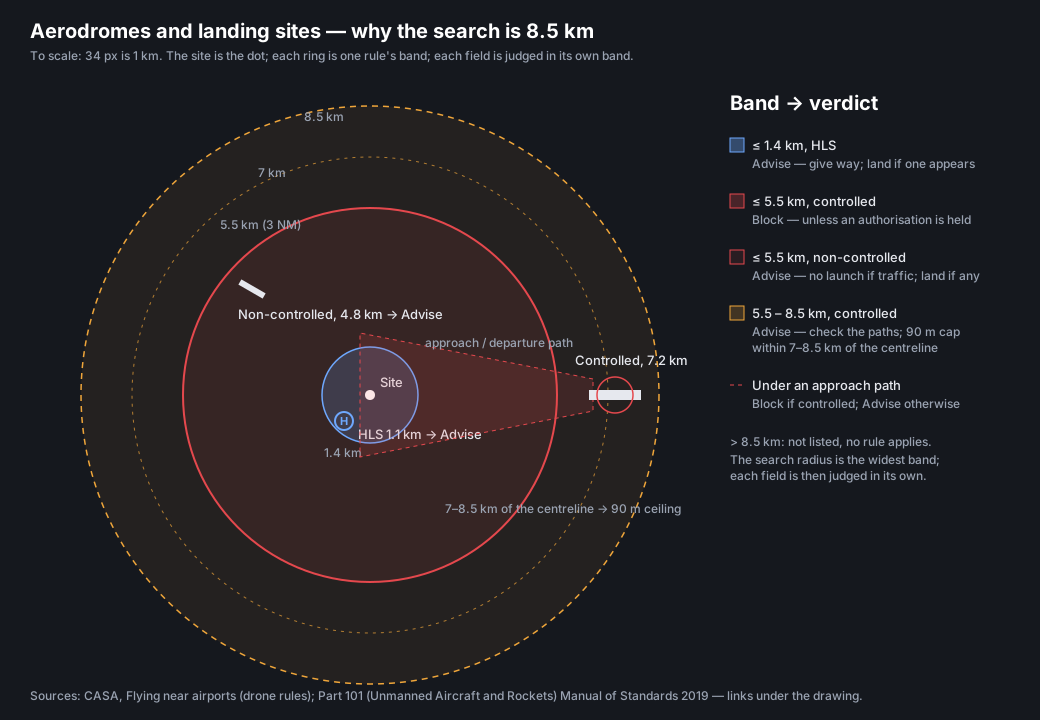
Every field within 8.5 km of the site. Controlled inside 5.5 km (3 NM) is a Block without an authorisation; non-controlled inside 5.5 km or an HLS inside 1.4 km is an Advise; a controlled field at 5.5–8.5 km is an Advise to check its approach and departure paths, which reach beyond 3 NM.
Name ICAO Type km CTAF
Approach and departure paths
A pilot judgement from the chart — no dataset publishes these paths. Use the chart link above.
Airspace column
The full stack over the site from the surface to the planned top, as the VTC draws it. Controlled airspace from the surface is not a Block on its own: below 400 ft AGL and more than 3 NM from a controlled aerodrome it asks for the CRP assessment and the Library §1.3 procedures (OM §4.4.3.2); within 3 NM, under a path or above 400 ft it needs a CASA approval.
Planned top: enter the maximum altitude in step 01 and the elevation on the ground row.
Volume (lowest first) Class Lower ft AMSL Upper ft AMSL
Prohibited, restricted and danger areas
Any area containing the site or within 1 km, with its status for the operating window. A prohibited area or an active restricted area is a Block; a danger area or military area is an Advise.
Designator Lower ft Upper ft Status Class.
NOTAMs
Location, FIR, Head Office and PRD NOTAMs for the window. List the ones that matter to an RPA — obstacles and cranes, temporary restrictions, UA NOTAMs, activity nearby. Runway and taxiway items are not relevant.
Brief on: the aerodromes near the site, FIR and area — open NAIPS
Weather for the window
Airspace authorisation
Required inside 5.5 km of a controlled aerodrome, in restricted airspace such as R407A/B, or above the standard conditions. For Sydney and the harbour, CASA's automated authorisation applies.
Ground hazards
Site check
Not yet recorded
Records the eight rows with the source and its date, signed by your session. Re-record after anything changes.
05

Operation & Licensing

Operation type, separation, and the release detail.

Fixed for this organisation, not a per-operation choice.
Controlled airspace & CASA authorisation
From the site check (04): the airspace column, the aerodromes and the approach paths
06

Additional Crew & Fleet

Extra pilots or aircraft on this operation. Optional.

Extra pilots or RPA taking part in this operation. Each is checked for currency and serviceability the same way as the primary.

Name ARN Endorsements
No additional pilots on this operation.
Make Model Registration Serial
No additional RPA on this operation.
07

Weather & Safety

Forecast for the operation window, fetched at planning time.

Forecast for the window
Waiting for a date, times and a coordinate
Do not operate the RPA if any of the following conditions are present or likely: precipitation (e.g. rain, snow or sleet); strong or gusty winds; wind speeds, temperatures or other conditions outside the RPA manufacturer's guidelines.
Procedures Library v1.3§1.1.4rev 27/04/2026
Second source — Bureau of Meteorology model (ACCESS-G)
Waiting for a date, times and a coordinate
Site conditions — air quality and pollen
Waiting for a date and a coordinate
An objection flags the operation for the planner; it does not stop the release.
The forecast block is not editable — it records what was retrieved and when. Observations go here, so the record shows both.
08

JSA — Crew & Hazards

Two stages (Ops Manual §4.2.3–4.2.4). Planning assessment now, from the site recon and the record: tick each item and write what you found and the control — the note is the evidence, in your own words, and may carry photos. On-site validation on the day: re-confirm each item with its own time, and record any variation or new hazard. Both stay on the record.

Filled from 03 Aircraft & Pilot, 05 Operation & Licensing and 06 Additional Crew.
airspace
ticked — time recorded
weather
ticked — time recorded
airspace
ticked — time recorded
notam
ticked — time recorded
site data
ticked — time recorded
currency
ticked — time recorded
rpa
ticked — time recorded
From the licence register
Remote pilot signature
Sign here — mouse, finger or stylus
Captured as an SVG path and bound to the authenticated signer
Chief Remote Pilot signature
Sign here — mouse, finger or stylus
Captured as an SVG path and bound to the authenticated signer
No crew listed yet - add support crew and observers on 02, or crew duties on 03.

Signing is blocked until every item is ticked with a note of at least 20 characters. The stored signature is the path plus the signer's ARN, the time of re-authentication, and a hash of the JSA as signed.

09

Risk Assessment

Ops Manual Appendix 3, Table 4 — a fresh assessment for this operation, scored by the crew and accepted by the CRP. Rows are seeded from what the record already shows and must each be confirmed; nothing here is the assessment until a person has scored it.

Tables 1–3: likelihood, consequence and the rating bands (Appendix 3)

Table 1 — Likelihood (L)

Table 2 — Consequence (C)

Table 3 — Rating R = L + C

Scoring is additive: R = L + C. A residual score of 6 or higher is not permitted to be accepted by the CRP; 4–5 proceeds only with treatment reducing it as low as reasonably practicable.

Risk No/ID Strategic Theme The Risk (what can happen and how) The Consequence Existing Controls (description and adequacy) with existing controls Additional Risk Treatment Strategies after treatment
L C R L C R (after controls)
All residual risks ≤ 5; Medium risks (4–5) reduced as low as reasonably practicable. Inserted automatically with the CRP signature; the CRP cannot sign while any residual score is 6 or higher or a seeded row is unconfirmed.
Remote pilot in command signature
Sign here — mouse, finger or stylus
Signs first: the scores are the crew's assessment
Chief Remote Pilot signature
Sign here — mouse, finger or stylus
Signs last: acceptance of the residual risks
10

Pre-Op Briefing

Two stages (Procedures Library App 2). Planned content now: what will be briefed under each heading, written from the record. Delivered on site: each tick records the time it was briefed, the attendees sign on, and the briefing officer signs.

delivered on site — tick when briefed
Pre-filled from the crew list; edit to match who was present.
From step 01.
ticked — time recorded
Pre-filled from the emergency contacts on 02 Client & Job; must be immediately to hand during the briefing.
Briefing officer signature
Sign here — mouse, finger or stylus
Captured as an SVG path and bound to the authenticated signer
11

Operational Release

Appendix 1. Submitted to the Chief Remote Pilot for authorisation.

From the internal job reference
From the selected pilot
From the licence register
From the job summary in Client & Job. Edit it there.
Tower frequency for YSSY, from the airspace check
Centre, radius and height band from step 01 — the area the authorisation covers.
Standing restrictions. The CRP adds any further limitations at authorisation — that block is not editable here.
Lead time
Waiting for a date and a start time

Lead time

Submitting —
Operation —
Notice given —
Notice required 24 h 00 m
Move the operation later, or record a short-notice waiver.
Submit the completed RPAS Operational Release Form to the Chief Remote Pilot by hand or by emailing at least 24 hours prior to the operation.
Procedures Library v1.3§1.1.3rev 27/04/2026
Remote pilot in command — block A
Sign here — mouse, finger or stylus
Signed when you submit for authorisation. Bound to your session.
12

Review & Confirm

Everything that will be submitted, and what is stopping it — read from this record and what is on screen now. Unsaved edits show here but are not on the record until Save draft.

Operation pack

A PDF rendered from the stored record - every line is what was saved, nothing is typed at export. Rendering takes about a minute; the pack is listed here when it lands and stays on the record.

No pack exported yet.

A draft can be saved at any time. Submitting signs block A and sends the release to the Chief Remote Pilot; the gates are evaluated on submission.